Stay away from “Chart Junk” –
Chart junk refers to visual content that serves no analytical purpose. It’s just there for decoration. Your customers will quickly tire of this content (as it is typically static) and this space on the scorecard will quickly become useless. If you try to use this space at a later date for some important data your customers will have to retrain themselves to look at that space. The space is better left blank.
Example of "Chart Junk"
Showing posts with label Chart. Show all posts
Tuesday, September 21, 2010
Monday, September 20, 2010
Pareto Chart template
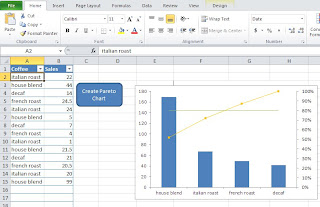
I've been gone a while working on a new template. This one is will allow you to import or enter data into an excel spreadsheet and create a pareto chart. I also wrote an article about how/when to use a pareto chart

Simply enter (or import) data into columns A and B. A should be your data to group by and B should be the values. No need to sum the data prior to importing it. The tool will do that for you. Please check it out. Let me know if you find it useful.

Simply enter (or import) data into columns A and B. A should be your data to group by and B should be the values. No need to sum the data prior to importing it. The tool will do that for you. Please check it out. Let me know if you find it useful.
Monday, August 23, 2010
MicroCharts in Excel
I ran across this post the other day. It's an old post but a cool concept for anyone creating dashboards in Excel. You can actually use some of the concepts in Microsoft Reporting Services as well.
http://chandoo.org/wp/2008/09/05/microcharting-excel-howto/
These guys have a lot of great ideas. I just stumbled across them for micro charting but many great Excel charting solutions.
You can go here to read a little more about microcharts and how to use them.
Click here to download a template I created based on one of the charts. As it exists today it will allow for 50 lines of data. To add more lines follow the steps below.
http://chandoo.org/wp/2008/09/05/microcharting-excel-howto/
These guys have a lot of great ideas. I just stumbled across them for micro charting but many great Excel charting solutions.
You can go here to read a little more about microcharts and how to use them.
Click here to download a template I created based on one of the charts. As it exists today it will allow for 50 lines of data. To add more lines follow the steps below.
Labels:
Chart,
Excel,
microchart,
Reporting Services,
sparkline
Subscribe to:
Posts (Atom)